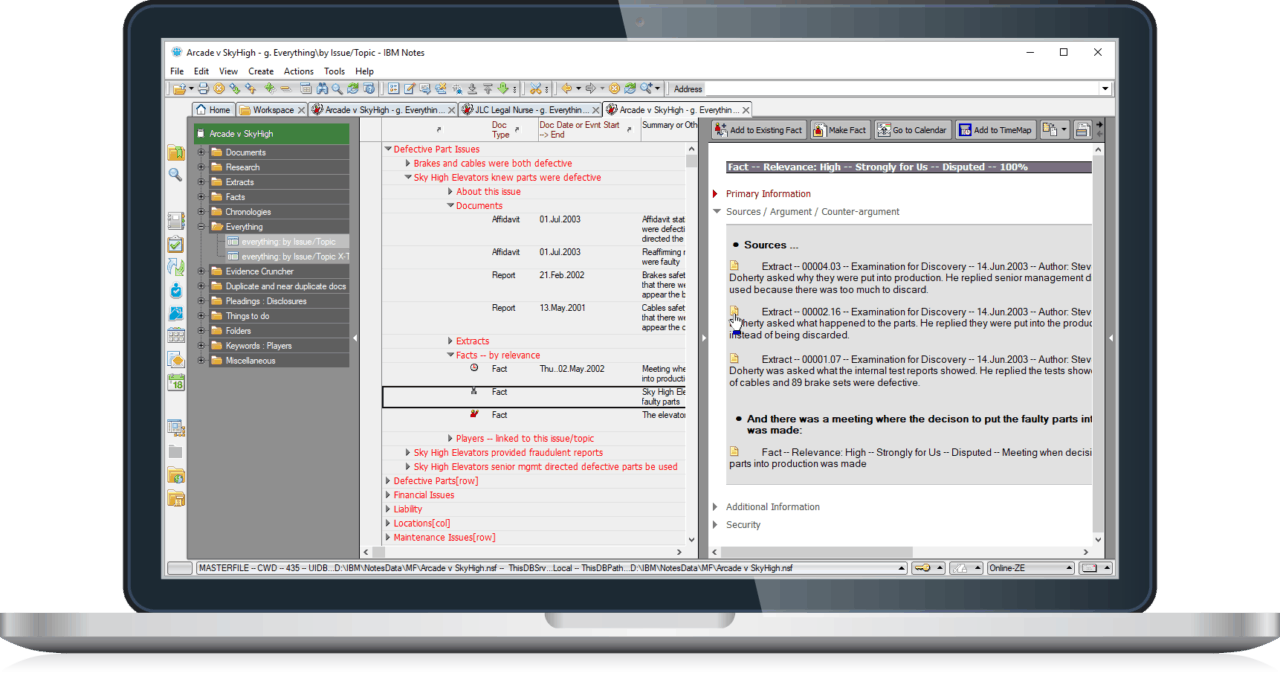
MasterFile

CaseMap

Concordance & Opticon

Summation
iBlaze

Case analysis and fact/issue management

Yes

Yes

--

--

Argument drafting

Yes

--

--

--

Evidence and transcript repository

Yes

--

Yes

Yes

Document management for work product

Yes

--

--

--

Full mobile functionality on/off-line with bidirectional sync

Yes

--

--

--

Security to keep specific documents or facts confidential

Yes

--

--

Real time transcripts

--

--

--

Yes


Compare cost -- MasterFile is affordably priced for small or solo practices

MasterFile 1

CaseMap 2

Concordance & Opticon
+ CaseMap
+ Worldox
2

Summation
iBlaze
+ CaseMap
+ Worldox
2

1 user

$395

$407

$2,398 3

$5,787 3

5 users

 $995

$1,935

$9,574 3

$13,295 3

10 users

$1,995

$3,870

$15,152 3

$24,260 3

Annual maintenance and support, single user

$150

$407

$1,578 3

$1,931 3

Annual maintenance and support, 5 users

$750

$1,935

$7,474 3

$4,472 3

3 Includes Worldox / Summation CaseMap plugins


Compare features and functionality -- MasterFile eliminates the complexity of using three systems

One, consistent, easy to use system for evidentiary documents, extracts, facts, work product and work in progress, in or out of the office.

Eliminate the headache and cost of purchasing, training and supporting several software, database and replication technologies.

Yes

No

No

No

Colour coded Fact Management views -- see at a glance where you're on solid ground, where you're exposed, and where work's needed.

Switch or open new windows to see facts and events by relevance, impact, status or one or more issues all simultaneously.

Yes

No

No

No

Argument Drafting captures all case knowledge: set out your argument and substantiate it, point by point, with direct links to source evidence, extracts or other facts.
 

Yes

No

No

No

Extract Repository lets you see documents with summaries of their key information -- see what's important at a glance, in one or more documents at one go. Eliminates going "note by note".

C-Pen OCR Scanner (optional) integration lets you scan and OCR just sentences and paragraphs from paper.

Extracts benefit from the same technology used for facts and documents (doc-links, live views by issue, author, security, etc.) making them much more than collections of simple electronic "notes" or "annotations".

Yes

No

No

No

Document repository automatically keeps your evidence, authorities, research, work product, work in progress, etc. sorted and categorized for ready reference by date, author, issue or document type, etc. -- pinpoint any document with just two or three mouse clicks.
 

Yes

No

No

No

Document management integrated and built-in -- eliminates need for complicated and costly third party work product/work in progress document management systems and their related expenses for training and support.

Yes

No

No

No

Worldox document management is not integrated with Summation or Concordance and stands alone

Powerful tools for exploring relationships between issues, players, places, documents, extracts, facts or events.

  • Follow and explore chains of relationships without being stuck in tedious moded windows.
  • Live "by issue" views brings together everything (documents, extracts, facts, events, players) linked to multiple issues without printed reports.
  • One issue and topic index eliminates reconciling issue lists in different software products.
  • Issue cross-table eliminates maintaining duplicate issue lists.


Yes

No

No

No

Doc-link technology -- one simple technology for descriptive, one-click, hyper-link references to documents, extracts and facts.

Eliminates spaghetti-like "evidence links" scattered and hidden throughout the database and having to set and remember hundreds or thousands of "short names" for every document or extract.

Yes

No

No

No

Full, unrestricted, on-line/off-line support for mobile/remote users, co-counsel or clients:

  • Work on anything -- evidentiary documents, work product, work in progress, facts, argument, transcripts, extracts, etc. -- off-line, without restrictions.
  • Synchronize all work product, work in progress, evidence, facts, etc., in all case files, at one go.
  • Synchronize everything bi-directionally.
  • Synchronize without forcing all users off the database.
  • Synchronize over the Internet -- no need to come into the office just to synchronize.
  • Automated, server-to-server synchronization for near real-time data at remote offices, war rooms, co-counsel and mobile teams. Global scalability.
  • On-line, real-time, secure Internet access without special "Internet options", Citrix, IIS, VPNs, etc.


Yes

No

Partial functionality with optional FYI Server & Worldox/Web

Partial functionality with optional WebBlaze® & Worldox/Web

Professional, practice area specific, client intake forms your clients complete, ensuring critical case information is not forgotten. Automated loading lets you transfer information to MasterFile, reducing tedious, time consuming and expensive data entry.

Yes

Yes

Yes

Yes

Note: CaseMap Intake forms are very basic and not practice area specific

Grab n Go Briefs for polished, ad hoc Word or PDF reports sets for your client or other use and without having to configure every aspect of the entire report set all at once in advance.

Yes

No

No

No

"Things to do" Centre to keep track of all follow up work for documents, extracts and facts: new evidence to add to argument, outstanding questions, prioritized reminders.

Yes

No

No

No

Free professional PDF print driver to create PDF files from any application.

Yes

No

No

No

Load your own/client Notes or Outlook e-mail selectively or in bulk.

Load Notes or Outlook e-mail, provided in response to e-discovery requests or content from other Notes databases selectively or in bulk. Outlook and Notes e-mail and documents are converted to PDF format and preserve native appearance.

Yes

No

No

No

OCR/PDF Evidence Cruncher to OCR and convert widely used desktop application files of electronic evidence files (e-discovery) and scanned paper documents into industry standard (non-proprietary), searchable, "image over text" Acrobat PDF files. Bulk load e-discovery in native format, crunched format, or both.

*Requires OCR/PDF Evidence Cruncher

Yes
Optional*

No

No

No

Create permanent production briefcases -- archives of documents that have been disclosed -- categorized for easy reference, for subsequent reproduction. Maintain complete production and disclosure history of each document.

Yes

No

No

Yes

Stamp documents with Bates page numbers, watermarks, headers and footers, even on electronic documents converted to PDF, during production. Production format can be paper or electronic -- as individual files or as a briefcase -- in PDF or native format.
 
*Requires OCR/PDF Evidence Cruncher

Yes
Optional*

No

No

Partial functionality

Drag and drop e-mail style folders to collect documents, extracts, and facts for special purposes such as witness kits, third party access, etc.

Yes

No

No

No

Integration with e-mail for team collaboration of documents, extracts or facts, work-product with full security.

Yes

No

No

No

Security and access control down to individual evidentiary/work-product documents, extracts and facts to keep critical work-product, evidence, arguments and strategy secure and private.

Yes

No

No

No


Notes to the "Compare MasterFile" table -- the Fine Print our competitors prefer you don't find out about their products

Pricing

1. Introductory MasterFile pricing. MasterFile requires Lotus Notes 6.5.4 -- available for US$119 per user, in single user quantities, including server software if needed. Click here to buy Notes on-line from our website.

Students and faculty at qualified academic institutions may register to use Notes without charge. Click here and expand the "Academic and Educational Pricing" section for more information regarding the IBM Academic Initiative.

2. All prices are in US dollars as of December 2007. Prices and features are subject to change without notice and refer to CaseMap® 7, Concordance® 8 & Opticon® 3 Mobile+Network, Summation® iBlaze® 2.8 Network and Worldox® 2002.

Products compared

MasterFile includes i) Fact Management, ii) an evidentiary repository and iii) comprehensive document management for work product and work in progress all at one low price.

Therefore, to provide an accurate cost and feature/functionality comparison, we compare MasterFile to CaseMap, CaseMap+Concordance+Opticon+Worldox and CaseMap+Summation+Worldox. CaseMap only features Fact Management, while Concordance and Summation iBlaze are just evidentiary repositories, necessitating integration of CaseMap with Concordance and Summation. Worldox only provides document management for work product; however, it doesn't integrate with the Concordance or Summation and stands alone to these.

In the table shaded orange we compare MasterFile to Concordance+Opticon and Summation iBlaze without CaseMap and Worldox so you can quickly assess the relative major feature/functions provided by each product on their own.

Concordance was evaluated with Opticon because it provides Concordance's document production facilities.

Mobile user support.
Remote office support.
Remote on-line access.
Synchronization.
System functionality.

Summation iBlaze, Concordance, CaseMap, Worldox 2002
Compare mobile user/remote office support -- all of these products have the following limitations:

  • Remote on-line, real-time access -- None of the systems provide remote on-line, real-time access to the primary office database over the Internet. For this you must also install purchase, set-up and maintain Summation's WebBlaze or Concordance's FYI server (and Concordance and Opticon Mobile products), or Worldox's Worldox/Web server. CaseMap doesn't offer a solution. Click here for an eye opening diagram illustrating this complexity.
  • Remote synchronization to allow working off line -- None of the systems can perform synchronization of a notebook database with the primary office database over the Internet (without the extra systems listed in point (a)), so mobile or remote users are cut off from the office until they come back into the office and synchronize.
  • Each system must be synchronized separately, manually, and then within each system, you must synchronize each of your cases, one by one.
  • Full, unrestricted, bi-directional synchronization and full mobile functionality of the Fact Management system (CaseMap) is not possible because:
     
    • CaseMap does not provide bi-directional synchronization -- updates can only be manually sent from the notebook database to the the primary office database once. After that, notebook users may not do additional work until a new copy of the database has been manually sent to them otherwise additional work not be resynchronized again.
    • CaseMap synchronization does not synchronize all data -- for example linked files containing source evidence are not synchronized.
    • Full functionality of CaseMap is not available when using mobile replica databases -- restrictions limit functionality.
    • CaseMap does not provide Argument Drafting.
       
  • Full mobile functionality of the Document Management system (Worldox) is not possible because the full functionality of Worldox is not available when mobile and disconnected from the network -- restrictions limit functionality.
  • The synchronization technologies do not provide automated or manual server-to-server synchronization across the Internet to support remote or co-counsel offices and provide up to date information in near real-time.

For a full discussion on mobile user support see our article: The truth about how "leading" litigation and document management systems really support mobile and remote users.

Summation iBlaze + WebBlaze
In addition to the above, iBlaze's synchronization technology locks the entire database during synchronization and does not allow multiple users to simultaneously synchronize. Therefore:

  • before synchronizing you must advise every user (in your office, at co-counsel, clients, etc.) to stop using the database, and
  • synchronizations by must be done one user at time.

Also, Summation strongly recommends that both source and destination databases be backed up before synchronizations, complicating the situation further.

Finally, Summation specifically states that running iBlaze over a Wide Area Network (WAN) is "NOT recommended, and NOT supported" [emphasis theirs and the Internet is a WAN]. They advise that you must install and support WebBlaze, Citrix MetaFrame or Microsoft Terminal Services server.

Summation's iBlaze + WebBlaze solution is stated as only providing partial functionality because, despite Summation's "integrated architecture", the solution has all of the above limitations of but point a; the other limitations was well as CaseMap limitations remain. iBlaze & WebBlaze simply allow remote on-line access to the primary office database. Note that iBlaze, even with WebBlaze still does not allow synchronization of your notebook database with the primary office database away from the office, over the internet or otherwise.

Concordance Mobile, Opticon Mobile and Concordance FYI Server
The optional FYI Server is stated as only providing partial functionality because, it still has all the above limitations of standard Concordance product but two -- points a and b; the other limitations as well as CaseMap limitations remain.

Worldox/Web
Worldox's optional Worldox/Web solution is stated as only providing partial functionality because the solution still has all of the above limitations but one -- point a; the other limitations as well as CaseMap limitations remain. Worldox/Web simply allows remote on-line access to the primary office database. Note that Worldox/Web still does not allow synchronization of your notebook database with the primary office database away from the office, over the internet or otherwise.

Fact Management.
Argument Drafting.
Exploring Relationships.

CaseMap
Compare Fact Management -- CaseMap has the following limitations:

  1. Does not colour code its views to allow risk assessment.
  2. Does not allow multiple views into the database to be displayed.
  3. Does not have a Facts by Issue view -- only a printed by Issue report is available.
  4. Does not have Argument Drafting.
  5. Relationship exploring is "moded" -- each time you follow a link to see items related to it, more and more windows open, cover other information and freeze the application until you close them. For example, you can not simultaneously explore two branches of relationships.
  6. CaseMap's issue list is not shared with Summation or Concordance, so its four level issue list has to be reconciled with Concordance's or Summation's one level issue list and kept up to date with changes made in Summation or Concordance.
  7. To full text search for everything, two searches are needed, one in CaseMap for facts and one on Concordance or Summation for documents.

Summation iBlaze
Compare Summation's ele